The Proof Before the Pitch: How Short-Form Videos Can Address Customer Doubts Before They Buy

A potential customer can like your product and still hesitate. They may wonder whether it suits their needs, how difficult it is to use, what the price includes, or whether the results will match the promise. Repeating promotional claims may not resolve these questions. A useful short-form video can show the details people need to make a more informed decision.
The goal is not to pressure viewers into buying. It is to help them evaluate an offer through clear explanations, realistic demonstrations, and evidence they can judge for themselves.
Identify the Doubt Behind the Decision

Start with the question that makes a customer pause. Not every hesitation concerns price. A shopper may worry about sizing, a service buyer may not understand the setup process, and a software prospect may be unsure whether a feature works with their existing tools.
Look for patterns in customer emails, support tickets, sales conversations, product reviews, and comments. Record recurring questions in the customers’ own words, then identify what information would help answer them.
For example, if customers ask whether a meal-kit subscription suits a household of one, a generic video about fresh ingredients misses the point. A clip showing portion sizes, delivery frequency, and available changes is more relevant. Each video should address one primary concern.
Replace Broad Claims With Demonstrations
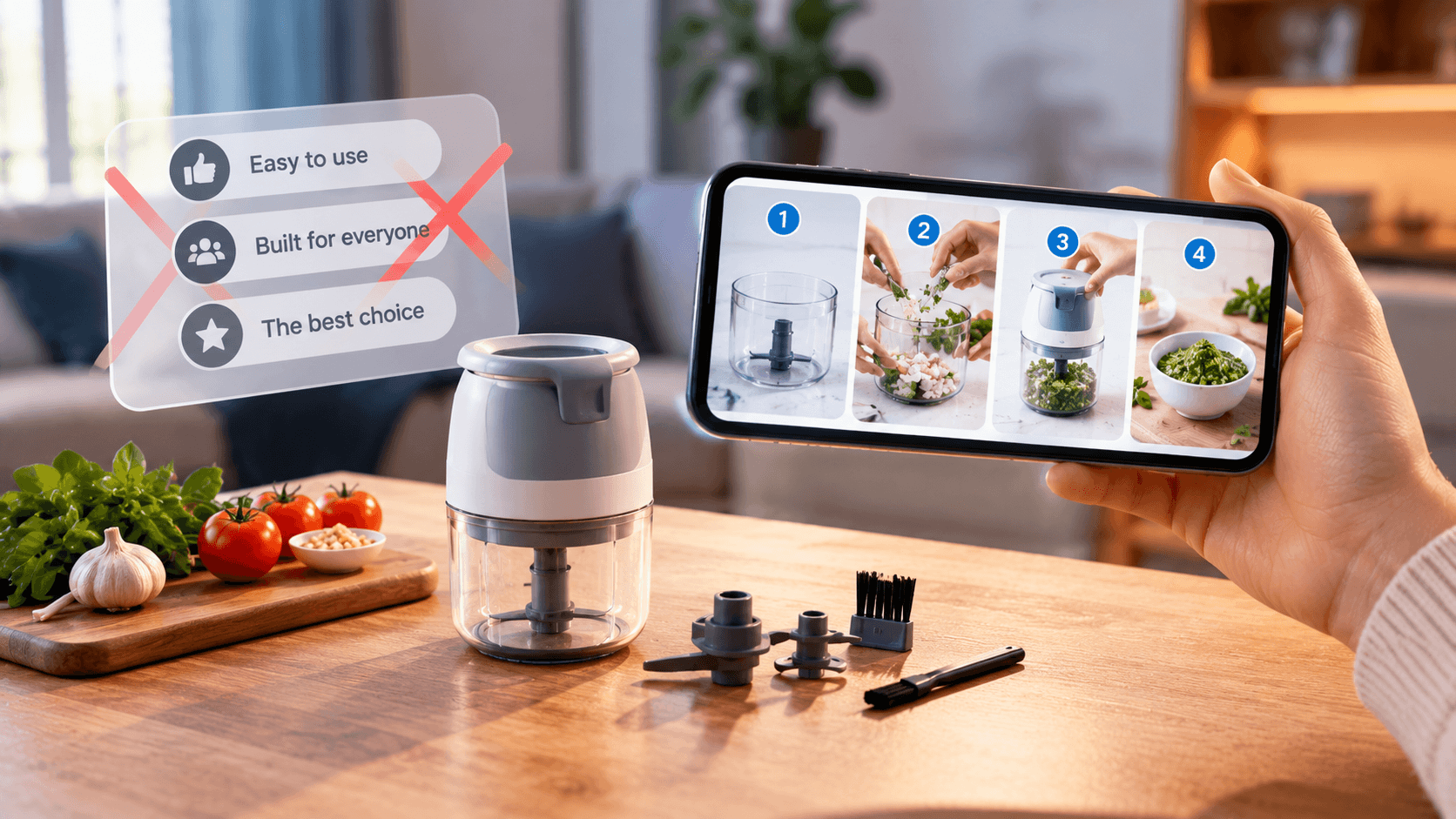
Statements such as “easy to use,” “built for everyone,” or “the best choice” are difficult to evaluate without context. A demonstration gives viewers something concrete to inspect. Show the actual product, the steps involved, the materials required, or the result under ordinary conditions.
Research summarized by the Academy of Marketing Science examines how step-by-step product demonstrations compare with videos that show only the finished result. Read its summary of research on product demonstrations . The findings suggest that showing the process can help viewers understand how a product works, although no video format guarantees a purchase.
A home-cleaning service, for instance, could show what happens during a standard visit: which rooms are covered, how long the appointment usually takes, and what customers should prepare. A software company might demonstrate importing a file, making an edit, and exporting the result. Avoid staged demonstrations that conceal important steps.
Match the Video Format to the Concern

Different doubts need different evidence. Choose a format based on the question rather than the latest social media trend.
-Product demonstration: Show what happens after purchase, from setup to a realistic result. An online store could demonstrate how a product is assembled and which tools are required.
- Suitability explainer: Clarify who is likely to benefit and who may need another option. A bookkeeping service might explain whether it supports freelancers, small teams, or both.
- Limitations video: Explain what the product does not do, what is excluded, or when another solution may be more appropriate. Honest boundaries can prevent mismatched expectations.
- Comparison video: Compare meaningful criteria such as compatibility, maintenance, plan limits, or total cost. Apply the same criteria to each option.
- Getting-started walkthrough: Show prerequisites, initial steps, and common setup requirements so viewers can understand the effort involved.
Keep each clip focused. If an explanation needs more time, make a short sequence of videos that answer different questions instead of cramming every objection into one fast-paced edit.
Use Evidence, Not Empty Reassurance
Customer confidence depends on the information presented, not just the production quality. Use current product footage, accurate specifications, clearly labeled examples, and genuine customer feedback obtained and used appropriately. If you show a result, explain the conditions that produced it. If an example is illustrative rather than a real customer outcome, make that clear.
Avoid statements such as “works for everyone,” “guaranteed results,” or “doubles sales” unless you can substantiate them and present important qualifications. The U.S. Federal Trade Commission explains that advertising claims must be truthful and supported by evidence. Its advertising guidance for small businesses is a useful reference when reviewing product claims.
Transparency also means including information that could affect a purchase. A subscription video should not emphasize the starting price while concealing material recurring costs or restrictions. A service demonstration should not imply that optional extras come with the standard package.
Research on online product presentation also examines how videos influence persuasion and purchase-channel preferences. The study published in Telematics and Informatics offers additional context, but businesses should evaluate their own audiences rather than assuming research guarantees a particular outcome.
Turn Customer Feedback Into a Repeatable Process
Treat customer questions as research, not scripts to copy without analysis. Group recurring concerns into themes such as price, ease of use, compatibility, reliability, eligibility, delivery, and expected outcomes. Prioritize questions that frequently cause confusion or appear during sales conversations.
Before scripting a video, write down three things: the exact question, the evidence you can show, and any limitation viewers need to understand. Ask a colleague who speaks directly with customers to review the draft. They may notice missing information that a marketing team overlooks.
After publishing, monitor comments and follow-up questions. If viewers still ask how installation works, the demonstration may need to be clearer. If a clip creates a misunderstanding, correct it instead of simply promoting it more heavily.
Where AutoReels Fits Into the Workflow
AutoReels can support parts of short-form video production. Its official features page describes AI-generated scripts, visuals, narration, subtitles, background music, and options to edit generated content. These capabilities may help teams produce explanatory videos, but they do not replace customer research or fact-checking.
The AutoReels workflow guide explains how users select a topic, configure video preferences, preview generated content, and manage scheduled publishing. For a customer-confidence campaign, prepare the message and evidence first. Then review the generated script and visuals to make sure the video answers the intended question accurately. Do not assume the tool independently identifies customer objections or verifies product claims.
Pre-Purchase Video Checklist
Before publishing, ask:
- Does the video answer one specific customer concern?
- Is the intended audience clear?
- Does it show evidence rather than unsupported promises?
- Are prices, prerequisites, and limitations represented accurately?
- Does the demonstration reflect realistic use?
- Have product details and customer statements been checked?
- Does the next step help viewers make an informed decision?
Short-form videos are most useful when they help people understand what they are considering. By identifying real doubts, demonstrating relevant details, and being transparent about limitations, businesses can provide better information without pretending that a video removes every uncertainty or guarantees a sale.